> ## Documentation Index
> Fetch the complete documentation index at: https://togetherai-migration.mintlify.site/llms.txt
> Use this file to discover all available pages before exploring further.
# Deploying a Fine-tuned Model
> Once your fine-tune job completes, you should see your new model in [your models dashboard](https://api.together.xyz/models).
 To use your model, you can either:
1. Host it on Together AI as a [dedicated endpoint(DE)](/docs/dedicated-inference) for an hourly usage fee
2. Run it immediately if the model supports [Serverless LoRA Inference](/docs/lora-inference)
3. Download your model and run it locally
## Hosting your model on Together AI
If you select your model in [the models dashboard](https://api.together.xyz/models) you can click `CREATE DEDICATED ENDPOINT` to create a [dedicated endpoint](https://docs.together.ai/edit/dedicated-endpoints-ui) for the fine-tuned model.
To use your model, you can either:
1. Host it on Together AI as a [dedicated endpoint(DE)](/docs/dedicated-inference) for an hourly usage fee
2. Run it immediately if the model supports [Serverless LoRA Inference](/docs/lora-inference)
3. Download your model and run it locally
## Hosting your model on Together AI
If you select your model in [the models dashboard](https://api.together.xyz/models) you can click `CREATE DEDICATED ENDPOINT` to create a [dedicated endpoint](https://docs.together.ai/edit/dedicated-endpoints-ui) for the fine-tuned model.
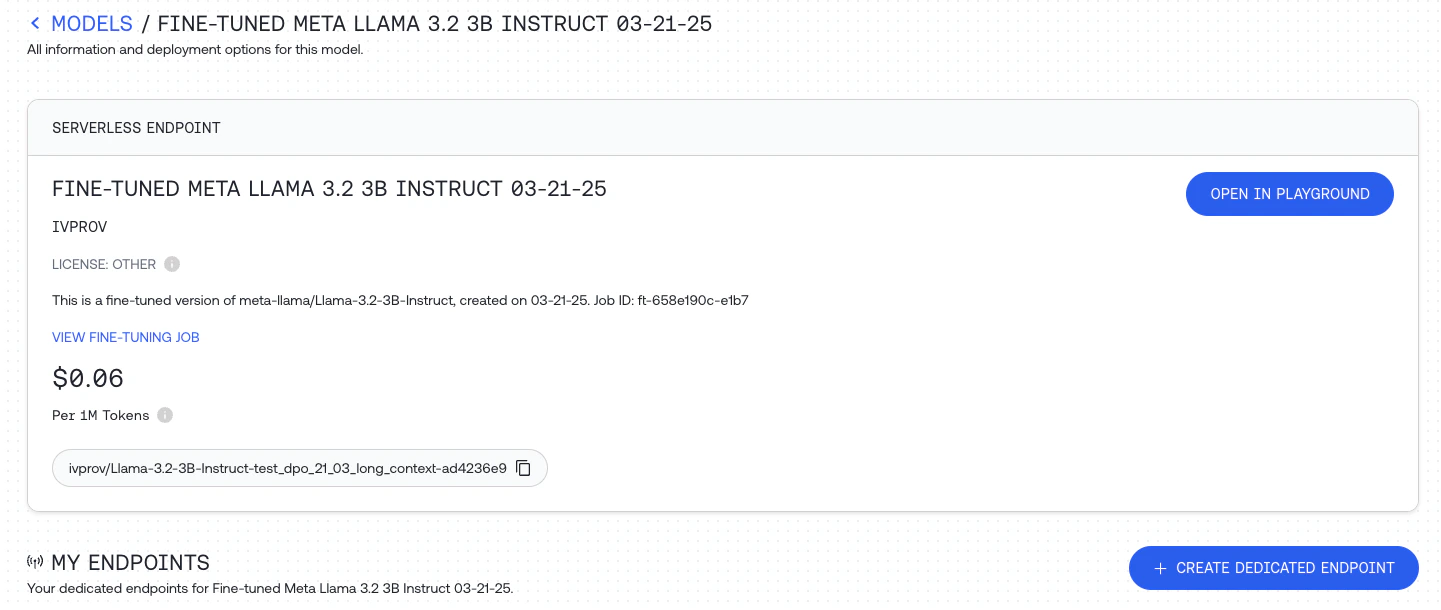 Once it's deployed, you can use the ID to query your new model using any of our APIs:
```shell CLI theme={null}
together chat.completions \
--model "[email protected]/Meta-Llama-3-8B-2024-07-11-22-57-17" \
--message "user" "What are some fun things to do in New York?"
```
```python Python theme={null}
import os
from together import Together
client = Together(api_key=os.environ.get("TOGETHER_API_KEY"))
stream = client.chat.completions.create(
model="[email protected]/Meta-Llama-3-8B-2024-07-11-22-57-17",
messages=[{"role": "user", "content": "What are some fun things to do in New York?"}],
stream=True,
)
for chunk in stream:
print(chunk.choices[0].delta.content or "", end="", flush=True)
```
```typescript TypeScript theme={null}
import Together from 'together-ai';
const together = new Together({
apiKey: process.env['TOGETHER_API_KEY'],
});
const stream = await together.chat.completions.create({
model: '[email protected]/Meta-Llama-3-8B-2024-07-11-22-57-17',
messages: [
{ role: 'user', content: 'What are some fun things to do in New York?' },
],
stream: true,
});
for await (const chunk of stream) {
// use process.stdout.write instead of console.log to avoid newlines
process.stdout.write(chunk.choices[0]?.delta?.content || '');
}
```
Hosting your fine-tuned model is charged per minute hosted. You can see the hourly pricing for fine-tuned model inference in [the pricing table](https://www.together.ai/pricing).
When you're not using the model, be sure to stop the endpoint from the [the models dashboard](https://api.together.xyz/models).
Read more about dedicated inference [here](/docs/dedicated-inference).
## Serverless LoRA Inference
If you fine-tuned the model using parameter efficient LoRA fine-tuning you can select the model in the models dashbaord and can click `OPEN IN PLAYGROUND` to quickly test the fine-tuned model.
You can also call the model directly just like any other model on the Together AI platform, by providing the unique fine-tuned model `output_name` that you can find for the specific model on the dashboard. See the list of models that [support LoRA Inference](/docs/lora-inference#supported-base-models).
```shell Shell theme={null}
MODEL_NAME_FOR_INFERENCE="[email protected]/Meta-Llama-3-8B-2024-07-11-22-57-17" #from Model page or Fine-tuning page
curl -X POST https://api.together.xyz/v1/completions \
-H "Authorization: Bearer $TOGETHER_API_KEY" \
-H "Content-Type: application/json" \
-d '{
"model": "'$MODEL_NAME_FOR_INFERENCE'",
"messages": [
{
"role": "user",
"content": "What are some fun things to do in New York?",
},
],
"max_tokens": 128
}'
```
```python Python theme={null}
import os
from together import Together
client = Together()
user_prompt = "debate the pros and cons of AI"
response = client.chat.completions.create(
model="[email protected]/Meta-Llama-3-8B-2024-07-11-22-57-17",
messages=[{"role": "user","content": user_prompt,}],
max_tokens=512,
temperature=0.7,
)
print(response.choices[0].message.content)
```
```typescript TypeScript theme={null}
import Together from 'together-ai';
const together = new Together();
const stream = await together.chat.completions.create({
model: '[email protected]/Meta-Llama-3-8B-2024-07-11-22-57-17',
messages: [
{ role: 'user', content: '"ebate the pros and cons of AI' },
],
stream: true,
});
for await (const chunk of stream) {
// use process.stdout.write instead of console.log to avoid newlines
process.stdout.write(chunk.choices[0]?.delta?.content || '');
}
```
You can even upload LoRA adapters from HuggingFace or an s3 bucket. Read more about Serverless LoRA Inference [here](/docs/lora-inference) .
## Running Your Model Locally
To run your model locally, first download it by calling `download` with your job ID:
```shell CLI theme={null}
together fine-tuning download "ft-bb62e747-b8fc-49a3-985c-f32f7cc6bb04"
```
```python python theme={null}
import os
from together import Together
client = Together(api_key=os.environ.get("TOGETHER_API_KEY"))
client.fine_tuning.download(
id="ft-bb62e747-b8fc-49a3-985c-f32f7cc6bb04",
output="my-model/model.tar.zst"
)
```
```typescript TypeScript theme={null}
import Together from 'together-ai';
const client = new Together({
apiKey: process.env['TOGETHER_API_KEY'],
});
await client.fineTune.download({
ft_id: 'ft-bb62e747-b8fc-49a3-985c-f32f7cc6bb04',
output: 'my-model/model.tar.zst',
});
```
Your model will be downloaded to the location specified in `output` as a `tar.zst` file, which is an archive file format that uses the [ZStandard](https://github.com/facebook/zstd) algorithm. You'll need to install ZStandard to decompress your model.
On Macs, you can use Homebrew:
```shell Shell theme={null}
brew install zstd
cd my-model
zstd -d model.tar.zst
tar -xvf model.tar
cd ..
```
Once your archive is decompressed, you should see the following set of files:
```
tokenizer_config.json
special_tokens_map.json
pytorch_model.bin
generation_config.json
tokenizer.json
config.json
```
These can be used with various libraries and languages to run your model locally. [Transformers](https://pypi.org/project/transformers/) is a popular Python library for working with pretrained models, and using it with your new model looks like this:
```python Python theme={null}
from transformers import AutoTokenizer, AutoModelForCausalLM
import torch
device = torch.device("cuda" if torch.cuda.is_available() else "cpu")
tokenizer = AutoTokenizer.from_pretrained("./my-model")
model = AutoModelForCausalLM.from_pretrained(
"./my-model",
trust_remote_code=True,
).to(device)
input_context = "Space Robots are"
input_ids = tokenizer.encode(input_context, return_tensors="pt")
output = model.generate(input_ids.to(device), max_length=128, temperature=0.7).cpu()
output_text = tokenizer.decode(output[0], skip_special_tokens=True)
print(output_text)
```
```
Space Robots are a great way to get your kids interested in science. After all, they are the future!
```
If you see the output, your new model is working!
You now have a custom fine-tuned model that you can run completely locally, either on your own machine or on networked hardware of your choice.
Once it's deployed, you can use the ID to query your new model using any of our APIs:
```shell CLI theme={null}
together chat.completions \
--model "[email protected]/Meta-Llama-3-8B-2024-07-11-22-57-17" \
--message "user" "What are some fun things to do in New York?"
```
```python Python theme={null}
import os
from together import Together
client = Together(api_key=os.environ.get("TOGETHER_API_KEY"))
stream = client.chat.completions.create(
model="[email protected]/Meta-Llama-3-8B-2024-07-11-22-57-17",
messages=[{"role": "user", "content": "What are some fun things to do in New York?"}],
stream=True,
)
for chunk in stream:
print(chunk.choices[0].delta.content or "", end="", flush=True)
```
```typescript TypeScript theme={null}
import Together from 'together-ai';
const together = new Together({
apiKey: process.env['TOGETHER_API_KEY'],
});
const stream = await together.chat.completions.create({
model: '[email protected]/Meta-Llama-3-8B-2024-07-11-22-57-17',
messages: [
{ role: 'user', content: 'What are some fun things to do in New York?' },
],
stream: true,
});
for await (const chunk of stream) {
// use process.stdout.write instead of console.log to avoid newlines
process.stdout.write(chunk.choices[0]?.delta?.content || '');
}
```
Hosting your fine-tuned model is charged per minute hosted. You can see the hourly pricing for fine-tuned model inference in [the pricing table](https://www.together.ai/pricing).
When you're not using the model, be sure to stop the endpoint from the [the models dashboard](https://api.together.xyz/models).
Read more about dedicated inference [here](/docs/dedicated-inference).
## Serverless LoRA Inference
If you fine-tuned the model using parameter efficient LoRA fine-tuning you can select the model in the models dashbaord and can click `OPEN IN PLAYGROUND` to quickly test the fine-tuned model.
You can also call the model directly just like any other model on the Together AI platform, by providing the unique fine-tuned model `output_name` that you can find for the specific model on the dashboard. See the list of models that [support LoRA Inference](/docs/lora-inference#supported-base-models).
```shell Shell theme={null}
MODEL_NAME_FOR_INFERENCE="[email protected]/Meta-Llama-3-8B-2024-07-11-22-57-17" #from Model page or Fine-tuning page
curl -X POST https://api.together.xyz/v1/completions \
-H "Authorization: Bearer $TOGETHER_API_KEY" \
-H "Content-Type: application/json" \
-d '{
"model": "'$MODEL_NAME_FOR_INFERENCE'",
"messages": [
{
"role": "user",
"content": "What are some fun things to do in New York?",
},
],
"max_tokens": 128
}'
```
```python Python theme={null}
import os
from together import Together
client = Together()
user_prompt = "debate the pros and cons of AI"
response = client.chat.completions.create(
model="[email protected]/Meta-Llama-3-8B-2024-07-11-22-57-17",
messages=[{"role": "user","content": user_prompt,}],
max_tokens=512,
temperature=0.7,
)
print(response.choices[0].message.content)
```
```typescript TypeScript theme={null}
import Together from 'together-ai';
const together = new Together();
const stream = await together.chat.completions.create({
model: '[email protected]/Meta-Llama-3-8B-2024-07-11-22-57-17',
messages: [
{ role: 'user', content: '"ebate the pros and cons of AI' },
],
stream: true,
});
for await (const chunk of stream) {
// use process.stdout.write instead of console.log to avoid newlines
process.stdout.write(chunk.choices[0]?.delta?.content || '');
}
```
You can even upload LoRA adapters from HuggingFace or an s3 bucket. Read more about Serverless LoRA Inference [here](/docs/lora-inference) .
## Running Your Model Locally
To run your model locally, first download it by calling `download` with your job ID:
```shell CLI theme={null}
together fine-tuning download "ft-bb62e747-b8fc-49a3-985c-f32f7cc6bb04"
```
```python python theme={null}
import os
from together import Together
client = Together(api_key=os.environ.get("TOGETHER_API_KEY"))
client.fine_tuning.download(
id="ft-bb62e747-b8fc-49a3-985c-f32f7cc6bb04",
output="my-model/model.tar.zst"
)
```
```typescript TypeScript theme={null}
import Together from 'together-ai';
const client = new Together({
apiKey: process.env['TOGETHER_API_KEY'],
});
await client.fineTune.download({
ft_id: 'ft-bb62e747-b8fc-49a3-985c-f32f7cc6bb04',
output: 'my-model/model.tar.zst',
});
```
Your model will be downloaded to the location specified in `output` as a `tar.zst` file, which is an archive file format that uses the [ZStandard](https://github.com/facebook/zstd) algorithm. You'll need to install ZStandard to decompress your model.
On Macs, you can use Homebrew:
```shell Shell theme={null}
brew install zstd
cd my-model
zstd -d model.tar.zst
tar -xvf model.tar
cd ..
```
Once your archive is decompressed, you should see the following set of files:
```
tokenizer_config.json
special_tokens_map.json
pytorch_model.bin
generation_config.json
tokenizer.json
config.json
```
These can be used with various libraries and languages to run your model locally. [Transformers](https://pypi.org/project/transformers/) is a popular Python library for working with pretrained models, and using it with your new model looks like this:
```python Python theme={null}
from transformers import AutoTokenizer, AutoModelForCausalLM
import torch
device = torch.device("cuda" if torch.cuda.is_available() else "cpu")
tokenizer = AutoTokenizer.from_pretrained("./my-model")
model = AutoModelForCausalLM.from_pretrained(
"./my-model",
trust_remote_code=True,
).to(device)
input_context = "Space Robots are"
input_ids = tokenizer.encode(input_context, return_tensors="pt")
output = model.generate(input_ids.to(device), max_length=128, temperature=0.7).cpu()
output_text = tokenizer.decode(output[0], skip_special_tokens=True)
print(output_text)
```
```
Space Robots are a great way to get your kids interested in science. After all, they are the future!
```
If you see the output, your new model is working!
You now have a custom fine-tuned model that you can run completely locally, either on your own machine or on networked hardware of your choice.