> ## Documentation Index
> Fetch the complete documentation index at: https://togetherai-migration.mintlify.site/llms.txt
> Use this file to discover all available pages before exploring further.
# Serverless LoRA Inference
> Deploy a fine-tuned or uploaded LoRA model on serverless for inference
LoRA (Low-Rank Adaptation of LLMs) is a popular and lightweight training technique that significantly reduces the number of trainable parameters. It works by inserting a smaller number of new weights into the model and only these are trained. During inference these updated weights are added to the frozen original model weights. This makes training with LoRA much faster, memory-efficient, and produces smaller model weights (a few hundred MBs), which are easier to store and share.
## Running LoRA Inference on Together
The Together API now supports LoRA inference on select base models, allowing you to either:
1. Do LoRA fine-tuning on the many available models through Together AI, then run inference right away
2. Bring Your Own Adapters: If you have custom LoRA adapters, that you've trained or obtained from HuggingFace, you can upload them and run inference
You can follow the instructions provided in the [Fine-Tuning Overview](/docs/fine-tuning-overview) to get started with LoRA Fine-tuning. Otherwise, follow the instructions below.
Adapters trained previous to 12/17 will not be available for LoRA serverless at the moment. We will be migrating your previous adapters to work with LoRA Serverless. A workaround is to download the adapter and re-upload it using Option 2 below.
## Supported Base Models
Currently, LoRA inference is supported for adapters based on the following base models in Together API. Whether using pre-fine-tuned models or bringing your own adapters, these are the only compatible models:
| Organization | Base Model Name | Base Model String | Quantization |
| ------------ | ---------------------- | -------------------------------------- | ------------ |
| Meta | Llama 3.1 8B Instruct | meta-llama/Meta-Llama-3.1-8B-Instruct | BF16 |
| Meta | Llama 3.1 70B Instruct | meta-llama/Meta-Llama-3.1-70B-Instruct | BF16 |
| Alibaba | Qwen2.5 14B Instruct | Qwen/Qwen2.5-14B-Instruct | FP8 |
| Alibaba | Qwen2.5 72B Instruct | Qwen/Qwen2.5-72B-Instruct | FP8 |
## Option 1: Fine-tune your LoRA model and run inference on it on Together
The Together API supports both LoRA and full fine-tuning. For serverless LoRA inference, follow these steps:
**Step 1: Fine-Tune with LoRA on Together API:** To start a Fine-tuning job with LoRA, follow the detailed instructions in the [Fine-Tuning Overview,](/docs/fine-tuning-overview) or follow the below snippets as a quick start:
```curl CLI theme={null}
together files upload "your-datafile.jsonl"
```
```python Python theme={null}
import os
from together import Together
client = Together(api_key=os.environ.get("TOGETHER_API_KEY"))
resp = client.files.upload(file="your-datafile.jsonl")
print(resp.model_dump())
```
```curl CLI theme={null}
together fine-tuning create \
--training-file "file-629e58b4-ff73-438c-b2cc-f69542b27980" \
--model "meta-llama/Meta-Llama-3.1-8B-Instruct-Reference" \
--lora
```
```python Python theme={null}
import os
from together import Together
client = Together(api_key=os.environ.get("TOGETHER_API_KEY"))
response = client.fine_tuning.create(
training_file = file_resp.id,
model = 'meta-llama/Meta-Llama-3.1-8B-Instruct-Reference',
lora = True,
)
print(response)
```
If you plan to use a validation set, make sure to set the `--validation-file` and `--n-evals` (the number of evaluations over the entire job) parameters. `--n-evals` needs to be set as a number above 0 in order for your validation set to be used.
**Step 2: Run LoRA Inference**:
Once you submit the fine-tuning job you should be able to see the model name in the response:
```json Json theme={null}
{
"id": "ft-44129430-ac08-4136-9774-aed81e0164a4",
"training_file": "file-629e58b4-ff73-438c-b2cc-f69542b27980",
"validation_file": "",
"model": "meta-llama/Meta-Llama-3.1-8B-Instruct-Reference",
"output_name": "zainhas/Meta-Llama-3.1-8B-Instruct-Reference-my-demo-finetune-4224205a",
...
}
```
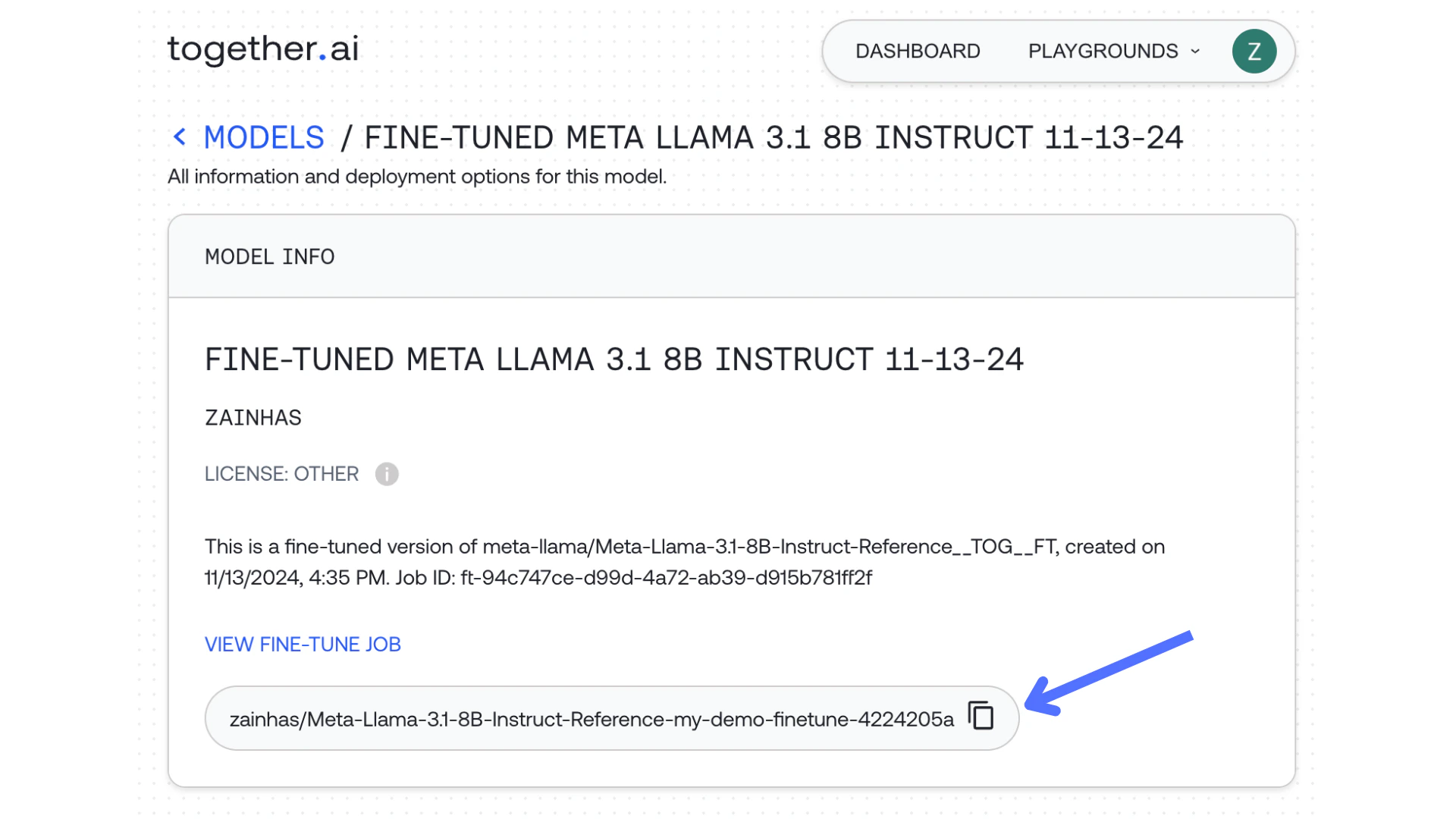
You can also see the status of the job and get the model name if you navigate to your fine-tuned model in the 'Model' or 'Jobs' tab in the Together dashboard. You'll see a model string – use it through the Together API.
 ```curl cURL theme={null}
MODEL_NAME_FOR_INFERENCE="zainhas/Meta-Llama-3.1-8B-Instruct-Reference-my-demo-finetune-4224205a"
curl -X POST https://api.together.xyz/v1/completions \
-H "Authorization: Bearer $TOGETHER_API_KEY" \
-H "Content-Type: application/json" \
-d '{
"model": "'$MODEL_NAME_FOR_INFERENCE'",
"messages": [
{
"role": "user",
"content": "debate the pros and cons of AI",
},
],
"max_tokens": 128
}'
```
```python Python theme={null}
import os
from together import Together
client = Together(api_key = TOGETHERAI_API_KEY)
user_prompt = "debate the pros and cons of AI"
response = client.chat.completions.create(
model="zainhas/Meta-Llama-3.1-8B-Instruct-Reference-my-demo-finetune-4224205a",
messages=[
{
"role": "user",
"content": user_prompt,
}
],
max_tokens=512,
temperature=0.7,
)
print(response.choices[0].message.content)
```
```typescript TypeScript theme={null}
import Together from 'together-ai';
const together = new Together();
const stream = await together.chat.completions.create({
model: 'zainhas/Meta-Llama-3.1-8B-Instruct-Reference-my-demo-finetune-4224205a',
messages: [
{ role: 'user', content: '"ebate the pros and cons of AI' },
],
stream: true,
});
for await (const chunk of stream) {
// use process.stdout.write instead of console.log to avoid newlines
process.stdout.write(chunk.choices[0]?.delta?.content || '');
}
```
Expected Response:
```json JSON theme={null}
{
"id": "8f2cb236c80ea20e-YYZ",
"object": "text.completion",
"created": 1734331375,
"model": "zainhas/Meta-Llama-3.1-8B-Instruct-Reference-my-demo-finetune-4224205a",
"prompt": [],
"choices": [
{
"text": "Here's a debate on the pros and cons of AI:\n\n**Moderator:** Welcome to today's debate on the pros and cons of AI. We have two debaters, Alex and Ben, who will present their arguments on the topic. Alex will argue in favor of AI, while Ben will argue against it. Let's begin with opening statements.\n\n**Alex (In Favor of AI):** Thank you, Moderator. AI has revolutionized the way we live and work. It has improved efficiency, productivity, and accuracy in various industries, such as healthcare, finance, and transportation. AI-powered systems can analyze vast amounts of data, identify",
"finish_reason": "length",
"seed": 5626645655383684000,
"logprobs": null,
"index": 0
}
],
"usage": {
"prompt_tokens": 18,
"completion_tokens": 128,
"total_tokens": 146,
"cache_hit_rate": 0
}
}
```
Your first couple queries may have slow TTFT (up to 10 seconds) but subsequent queries should be fast!
## Option 2: Upload a Custom Adapter & run inference on it on Together
The Together API also allows you to upload your own private LoRA adapter files for inference. To upload a custom adapter:
### **Step 1: Prepare Adapter File:**
Ensure your adapter file is compatible with the above supported base models.
If you are getting the adapter from HuggingFace you can find information about the base model there as well.
You need to make sure that the adapter you are trying to upload has an `adapter_config.json` and `adapter_model.safetensors` files.
### **Step 2: Upload Adapter Using Together API:**
**Source 1: Source the adapter from an AWS s3 bucket:**
```curl cURL theme={null}
#!/bin/bash
# uploadadapter.sh
# Generate presigned adapter url
ADAPTER_URL="s3://test-s3-presigned-adapter/my-70B-lora-1.zip"
PRESIGNED_ADAPTER_URL=$(aws s3 presign ${ADAPTER_URL})
# Specify additional params
MODEL_TYPE="adapter"
ADAPTER_MODEL_NAME="test-lora-model-70B-1"
BASE_MODEL="meta-llama/Meta-Llama-3.1-70B-Instruct"
DESCRIPTION="test_70b_lora_description" # Lazy curl replace below, don't put spaces here.
# Upload
curl -v https://api.together.xyz/v0/models \
-H 'Content-Type: application/json' \
-H "Authorization: Bearer $TOGETHER_API_KEY" \
-d '{
"model_name": "'${ADAPTER_MODEL_NAME}'",
"model_source": "'${PRESIGNED_ADAPTER_URL}'",
"model_type": "'${MODEL_TYPE}'",
"base_model": "'${BASE_MODEL}'",
"description": "'${DESCRIPTION}'"
}'
```
**Source 2: Source the adapter from HuggingFace:**
Make sure that the adapter contains `adapter_config.json` and `adapter_model.safetensors` files in Files and versions tab on HuggingFace.
```curl cURL theme={null}
# From HuggingFace
PRESIGNED_ADAPTER_URL="https://huggingface.co/RayBernard/llama3.2-3B-ft-reasoning"
MODEL_TYPE="adapter"
BASE_MODEL="meta-llama/Llama-3.2-3B-Instruct"
DESCRIPTION="test_lora_3B"
ADAPTER_MODEL_NAME=test-lora-model-creation-3b
# Uplaod
curl -v https://api.together.xyz/v0/models \
-H 'Content-Type: application/json' \
-H "Authorization: Bearer $TOGETHER_API_KEY" \
-d '{
"model_name": "'${ADAPTER_MODEL_NAME}'",
"model_source": "'${PRESIGNED_ADAPTER_URL}'",
"model_type": "'${MODEL_TYPE}'",
"description": "'${DESCRIPTION}'",
"hf_token": "'${HF_TOKEN}'",
}'
```
For both Option 1 and 2 the output contains the "job\_id" and "model\_name". The model name must be unique, if you attempt to upload a model name that previously was uploaded you will receive a "Model name already exists" error.
```json JSON theme={null}
{
"data": {
"job_id": "job-b641db51-38e8-40f2-90a0-5353aeda6f21", <------- Job ID
"model_name": "devuser/test-lora-model-creation-3b",
"model_source": "remote_archive"
},
"message": "job created"
}
```
You can poll our API using the "job\_id" until the adapter has finished uploading.
```curl cURL theme={null}
curl https://api.together.xyz/v1/jobs/job-b641db51-38e8-40f2-90a0-5353aeda6f21 \
-H "Authorization: Bearer $TOGETHER_API_KEY" | jq .
```
The output contains a "status" field. When the "status" is "Complete", your adapter is ready!
```json JSON theme={null}
{
"type": "adapter_upload",
"job_id": "job-b641db51-38e8-40f2-90a0-5353aeda6f21",
"status": "Complete",
"status_updates": []
}
```
### **Step 3: Run LoRA Inference**:
Take the model\_name string you get from the adapter upload output below, then use it through the Together API.
```json JSON theme={null}
{
"data": {
"job_id": "job-b641db51-38e8-40f2-90a0-5353aeda6f21",
"model_name": "devuser/test-lora-model-creation-3b", <------ Model Name
"model_source": "remote_archive"
},
"message": "job created"
}
```
Make Together API call to the model:
```curl cURL theme={null}
MODEL_NAME_FOR_INFERENCE="devuser/test-lora-model-creation-3b"
curl -X POST https://api.together.xyz/v1/completions \
-H "Authorization: Bearer $TOGETHER_API_KEY" \
-H "Content-Type: application/json" \
-d '{
"model": "'$MODEL_NAME_FOR_INFERENCE'",
"prompt": "Q: The capital of France is?\nA:",
"temperature": 0.8,
"max_tokens": 128
}'
```
Expected Response:
```json JSON theme={null}
{
"id": "8f3317dd3c3a39ef-YYZ",
"object": "text.completion",
"created": 1734398453,
"model": "devuser/test-lora-model-creation-3b",
"prompt": [],
"choices": [
{
"text": " Paris\nB: Berlin\nC: Warsaw\nD: London\nAnswer: A",
"finish_reason": "eos",
"seed": 13424880326038300000,
"logprobs": null,
"index": 0
}
],
"usage": {
"prompt_tokens": 10,
"completion_tokens": 18,
"total_tokens": 28,
"cache_hit_rate": 0
}
}
```
## LoRA Adapter Limits
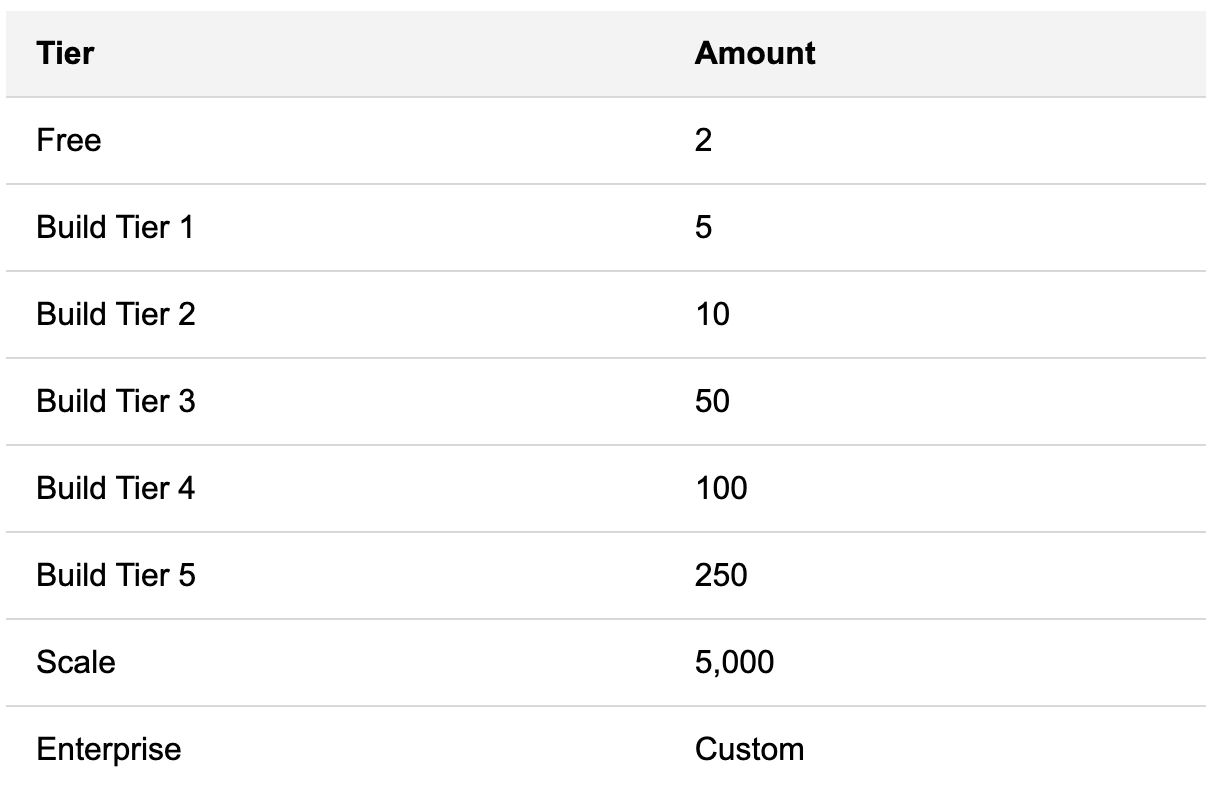
You are limited to the following number of LoRA adapters hosted based on build tier:
```curl cURL theme={null}
MODEL_NAME_FOR_INFERENCE="zainhas/Meta-Llama-3.1-8B-Instruct-Reference-my-demo-finetune-4224205a"
curl -X POST https://api.together.xyz/v1/completions \
-H "Authorization: Bearer $TOGETHER_API_KEY" \
-H "Content-Type: application/json" \
-d '{
"model": "'$MODEL_NAME_FOR_INFERENCE'",
"messages": [
{
"role": "user",
"content": "debate the pros and cons of AI",
},
],
"max_tokens": 128
}'
```
```python Python theme={null}
import os
from together import Together
client = Together(api_key = TOGETHERAI_API_KEY)
user_prompt = "debate the pros and cons of AI"
response = client.chat.completions.create(
model="zainhas/Meta-Llama-3.1-8B-Instruct-Reference-my-demo-finetune-4224205a",
messages=[
{
"role": "user",
"content": user_prompt,
}
],
max_tokens=512,
temperature=0.7,
)
print(response.choices[0].message.content)
```
```typescript TypeScript theme={null}
import Together from 'together-ai';
const together = new Together();
const stream = await together.chat.completions.create({
model: 'zainhas/Meta-Llama-3.1-8B-Instruct-Reference-my-demo-finetune-4224205a',
messages: [
{ role: 'user', content: '"ebate the pros and cons of AI' },
],
stream: true,
});
for await (const chunk of stream) {
// use process.stdout.write instead of console.log to avoid newlines
process.stdout.write(chunk.choices[0]?.delta?.content || '');
}
```
Expected Response:
```json JSON theme={null}
{
"id": "8f2cb236c80ea20e-YYZ",
"object": "text.completion",
"created": 1734331375,
"model": "zainhas/Meta-Llama-3.1-8B-Instruct-Reference-my-demo-finetune-4224205a",
"prompt": [],
"choices": [
{
"text": "Here's a debate on the pros and cons of AI:\n\n**Moderator:** Welcome to today's debate on the pros and cons of AI. We have two debaters, Alex and Ben, who will present their arguments on the topic. Alex will argue in favor of AI, while Ben will argue against it. Let's begin with opening statements.\n\n**Alex (In Favor of AI):** Thank you, Moderator. AI has revolutionized the way we live and work. It has improved efficiency, productivity, and accuracy in various industries, such as healthcare, finance, and transportation. AI-powered systems can analyze vast amounts of data, identify",
"finish_reason": "length",
"seed": 5626645655383684000,
"logprobs": null,
"index": 0
}
],
"usage": {
"prompt_tokens": 18,
"completion_tokens": 128,
"total_tokens": 146,
"cache_hit_rate": 0
}
}
```
Your first couple queries may have slow TTFT (up to 10 seconds) but subsequent queries should be fast!
## Option 2: Upload a Custom Adapter & run inference on it on Together
The Together API also allows you to upload your own private LoRA adapter files for inference. To upload a custom adapter:
### **Step 1: Prepare Adapter File:**
Ensure your adapter file is compatible with the above supported base models.
If you are getting the adapter from HuggingFace you can find information about the base model there as well.
You need to make sure that the adapter you are trying to upload has an `adapter_config.json` and `adapter_model.safetensors` files.
### **Step 2: Upload Adapter Using Together API:**
**Source 1: Source the adapter from an AWS s3 bucket:**
```curl cURL theme={null}
#!/bin/bash
# uploadadapter.sh
# Generate presigned adapter url
ADAPTER_URL="s3://test-s3-presigned-adapter/my-70B-lora-1.zip"
PRESIGNED_ADAPTER_URL=$(aws s3 presign ${ADAPTER_URL})
# Specify additional params
MODEL_TYPE="adapter"
ADAPTER_MODEL_NAME="test-lora-model-70B-1"
BASE_MODEL="meta-llama/Meta-Llama-3.1-70B-Instruct"
DESCRIPTION="test_70b_lora_description" # Lazy curl replace below, don't put spaces here.
# Upload
curl -v https://api.together.xyz/v0/models \
-H 'Content-Type: application/json' \
-H "Authorization: Bearer $TOGETHER_API_KEY" \
-d '{
"model_name": "'${ADAPTER_MODEL_NAME}'",
"model_source": "'${PRESIGNED_ADAPTER_URL}'",
"model_type": "'${MODEL_TYPE}'",
"base_model": "'${BASE_MODEL}'",
"description": "'${DESCRIPTION}'"
}'
```
**Source 2: Source the adapter from HuggingFace:**
Make sure that the adapter contains `adapter_config.json` and `adapter_model.safetensors` files in Files and versions tab on HuggingFace.
```curl cURL theme={null}
# From HuggingFace
PRESIGNED_ADAPTER_URL="https://huggingface.co/RayBernard/llama3.2-3B-ft-reasoning"
MODEL_TYPE="adapter"
BASE_MODEL="meta-llama/Llama-3.2-3B-Instruct"
DESCRIPTION="test_lora_3B"
ADAPTER_MODEL_NAME=test-lora-model-creation-3b
# Uplaod
curl -v https://api.together.xyz/v0/models \
-H 'Content-Type: application/json' \
-H "Authorization: Bearer $TOGETHER_API_KEY" \
-d '{
"model_name": "'${ADAPTER_MODEL_NAME}'",
"model_source": "'${PRESIGNED_ADAPTER_URL}'",
"model_type": "'${MODEL_TYPE}'",
"description": "'${DESCRIPTION}'",
"hf_token": "'${HF_TOKEN}'",
}'
```
For both Option 1 and 2 the output contains the "job\_id" and "model\_name". The model name must be unique, if you attempt to upload a model name that previously was uploaded you will receive a "Model name already exists" error.
```json JSON theme={null}
{
"data": {
"job_id": "job-b641db51-38e8-40f2-90a0-5353aeda6f21", <------- Job ID
"model_name": "devuser/test-lora-model-creation-3b",
"model_source": "remote_archive"
},
"message": "job created"
}
```
You can poll our API using the "job\_id" until the adapter has finished uploading.
```curl cURL theme={null}
curl https://api.together.xyz/v1/jobs/job-b641db51-38e8-40f2-90a0-5353aeda6f21 \
-H "Authorization: Bearer $TOGETHER_API_KEY" | jq .
```
The output contains a "status" field. When the "status" is "Complete", your adapter is ready!
```json JSON theme={null}
{
"type": "adapter_upload",
"job_id": "job-b641db51-38e8-40f2-90a0-5353aeda6f21",
"status": "Complete",
"status_updates": []
}
```
### **Step 3: Run LoRA Inference**:
Take the model\_name string you get from the adapter upload output below, then use it through the Together API.
```json JSON theme={null}
{
"data": {
"job_id": "job-b641db51-38e8-40f2-90a0-5353aeda6f21",
"model_name": "devuser/test-lora-model-creation-3b", <------ Model Name
"model_source": "remote_archive"
},
"message": "job created"
}
```
Make Together API call to the model:
```curl cURL theme={null}
MODEL_NAME_FOR_INFERENCE="devuser/test-lora-model-creation-3b"
curl -X POST https://api.together.xyz/v1/completions \
-H "Authorization: Bearer $TOGETHER_API_KEY" \
-H "Content-Type: application/json" \
-d '{
"model": "'$MODEL_NAME_FOR_INFERENCE'",
"prompt": "Q: The capital of France is?\nA:",
"temperature": 0.8,
"max_tokens": 128
}'
```
Expected Response:
```json JSON theme={null}
{
"id": "8f3317dd3c3a39ef-YYZ",
"object": "text.completion",
"created": 1734398453,
"model": "devuser/test-lora-model-creation-3b",
"prompt": [],
"choices": [
{
"text": " Paris\nB: Berlin\nC: Warsaw\nD: London\nAnswer: A",
"finish_reason": "eos",
"seed": 13424880326038300000,
"logprobs": null,
"index": 0
}
],
"usage": {
"prompt_tokens": 10,
"completion_tokens": 18,
"total_tokens": 28,
"cache_hit_rate": 0
}
}
```
## LoRA Adapter Limits
You are limited to the following number of LoRA adapters hosted based on build tier: