

Quick Links
- Install the CLI
- Authenticate
- Prepare your Data
- Upload your Data
- Start Fine-Tuning
- Monitor Progress
- Deploy your Fine-Tuned Model
- Fine-tuning Pricing
Install the CLI
To get started, install thetogether Python CLI:
Authenticate
The API Key can be configured by setting theTOGETHER_API_KEY environment variable, like this:
Upload your Data
See the data preparation instruction to understand the requirements and its readiness. To upload your data, run the following command. ReplacePATH_TO_DATA_FILE with the path to your dataset.
joke_explanations.jsonl. Here’s what the output looks like:
Start Fine-Tuning
We’re now ready to start the fine-tuning job! To do so, run the following command:- Replace
FILE_IDwith the ID of the training file. - Replace
MODEL_NAMEwith the API name of the base model you want to fine-tune (refer to the models list). - Replace
WANDB_API_KEYwith your own Weights & Biases API key (Optional).
FILE_ID with the ID we got when we uploaded the dataset and the MODEL_NAME with the model we want to use, which in this example, is meta-llama/Meta-Llama-3-8B. Here’s a sample output:
id as you’ll need that to track progress and download model weights. For example, from the sample output above, ft-3b883474-f39c-40d9-9d5a-7f97ba9eeb9f is your Job ID.
A fine-tune job can take anywhere between a couple minutes to hours depending on the base model, dataset size, number of epochs, and job queue. Also, unless you set --quiet in the CLI, there will be a confirmation step to make sure you are aware of any defaults or arguments that needed to be reset from their original inputs for this specific finetune job.
Monitor Progress
View progress by navigating to the Jobs tab in the Playground. You can also monitor progress using the CLI: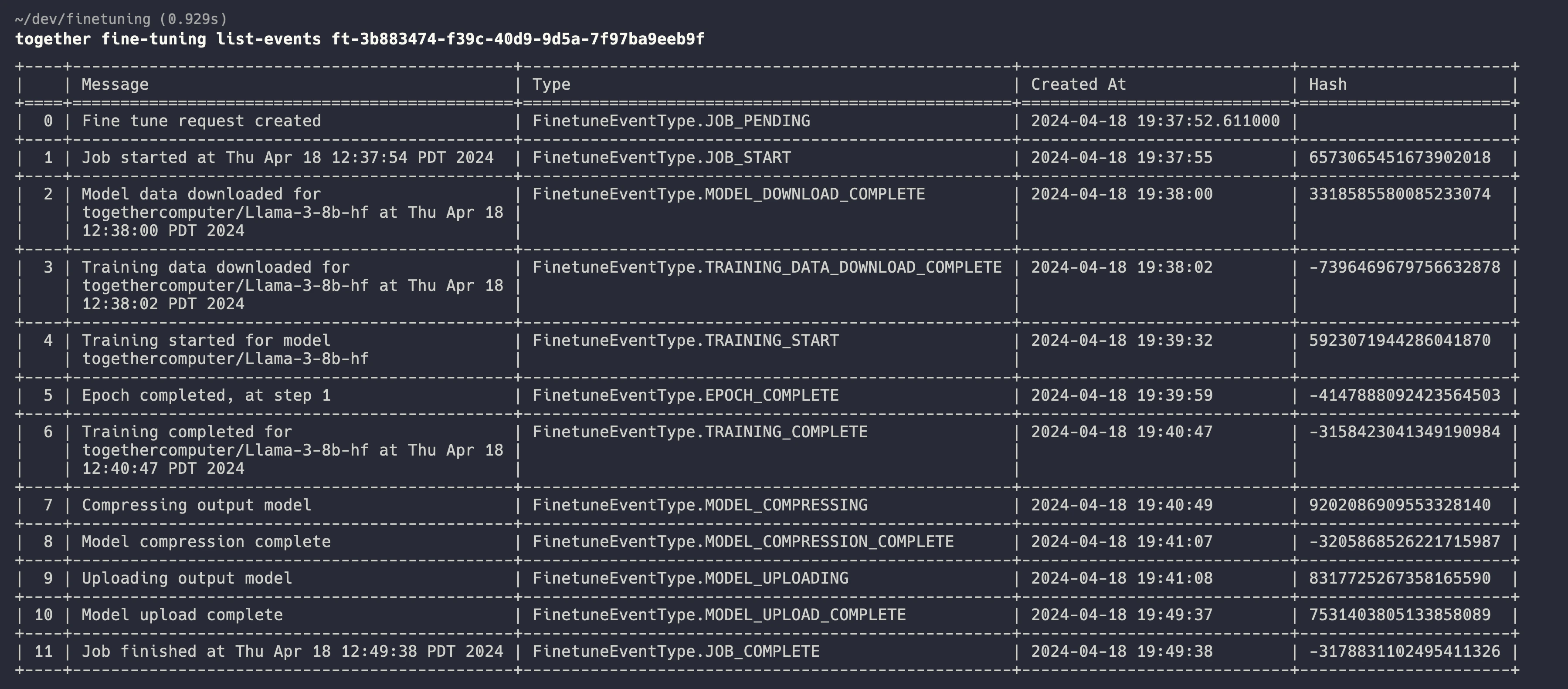
Deploy your Fine-Tuned Model
Host your Model
Once the fine-tune job completes, you will be able to see your model in the Playground Models page. You can directly deploy the model through the web UI by clicking on the model, selecting your hardware and clicking play! Available hardware includes RTX6000, L40, L40S, A100 PCIe, A100 SXM and H100. Hardware options displayed depends on model constraints and overall hardware availability. Once the model is deployed, you can use the model through the playground or through our inference API. For the inference API, follow the instructions in the inference documentation. Please note that hosting your fine-tuned model is charged per minute hosted. See the hourly pricing for fine-tuned model inference in the pricing table. When you are not using the model, be sure to stop the endpoint through the web UI. However, frequent starting and stopping may incur delay on your deployment. To directly download the weights, see the instructions here.Pricing
Pricing for fine-tuning is based on model size, the number of tokens, and the number of epochs. You can estimate fine-tuning pricing with our calculator. The tokenization step is a part of the fine-tuning process on our API, and the exact number of tokens and the price of your job will be available after the tokenization step is done. You can find the information in the “JOBS” page or retrieve them by runningtogether fine-tuning retrieve $JOB_ID in your CLI.
Q: Is there a minimum price? The minimum price for a fine-tuning job is 366. If you fine-tune this model for 1M tokens for 1 epoch, it is 5.
Q: What happens if I cancel my job? The final price will be determined baed on the amount of tokens used to train your model up to the point of the cancellation. For example, if your fine-tuning job is using Llama-3-8B with a batch size of 8, and you cancelled the job after 1000 training steps, the total number of tokens used for training is 8192 [context length] x 8 [batch size] x 1000 [steps] = 65,536,000. This results in $27.21 as you can check in the pricing page.